
Free portfolio review
Know what
you own.
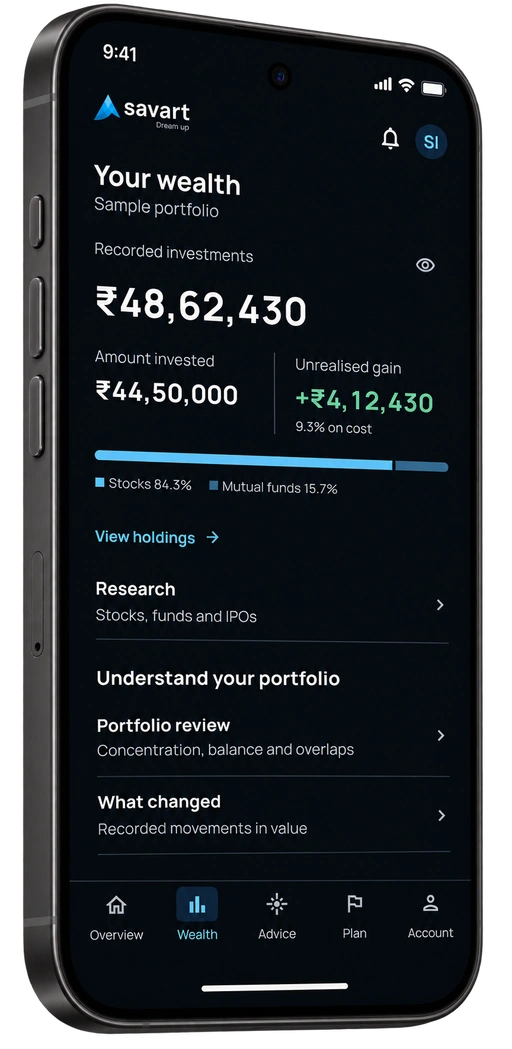
See your stocks and mutual funds together, understand your allocation and explore Savart’s views on supported stocks.
Read-only connections keep your investments in your own account.
Where your
money sits.
The fund you buy each month and the shares you’ve held for years belong in the same picture.
- Stocks and mutual funds
- Bring available holdings from the accounts you choose to connect into one view.
- How your money is spread
- See the mix of assets and sectors across the holdings in your portfolio.
- Your portfolio value
- See available values and gains or losses where price and purchase data are present.
- Savart’s stock assessments
- See the assessments available for your holdings, with coverage shown in the app.
Start with
your accounts.
You choose what to connect. Your investments stay where they are while you take a closer look.
-
Open Savart
Get the app and sign in to your account.
-
Choose the accounts to connect
Select an available connection and give your consent to fetch your holdings.
-
Explore your portfolio
Look through your holdings, allocation and the stock assessments available in the app.
Go beyond
the price.
A stock assessment is a starting point. A full report gives you the research behind it.
Full research reports are separate from the free portfolio overview.
See how research worksThe business
Understand how a company earns money and what could support its growth.
Financial strength
Look at profitability, the balance sheet and the company’s track record.
Valuation
Consider the price alongside the business and its prospects.
The risks
Read what could weaken the investment case, as well as what supports it.
Choose what to explore.
The app shows which reports you can open. Buy individual reports or packs when you want more.
View research optionsBefore you connect.
What does the free review include?
See available stocks and mutual funds from your connected accounts, their allocation and portfolio values where data is available. You can also see the stock assessments the app makes available for your holdings. Full research reports have separate access options.
Will connecting an account move my investments?
No. The connections used for portfolio review are read-only. You choose which accounts to connect and give your consent. Your investments stay in your own account; the connection does not place trades.
Will every holding have an assessment?
Coverage varies, and free stock assessments are limited. The app shows which assessments and research reports you can access for your holdings.
Do I need to buy a plan?
You do not need a paid membership for the free portfolio overview. Personalised investment advice is available with a paid plan. Research reports can also be bought individually or in packs without a subscription.